The problem
A field service office loses jobs between the inquiry and the callback. Leads arrive from the website, a HubSpot form and phone calls, and someone has to read each one. They have to work out the pest and the urgency, check whether the caller is already a customer, price the job, find a technician window and create the CRM record. Those steps are the same for every lead, and they happen while the customer is calling the next company on the list.
I built the Lead-to-Booking Agent as that one silo of a pest control back office. The company is fictional: Ridgeway Pest Control, with branches in Jacksonville, Savannah and Mobile. The rule I designed around is that every lead leaves the workflow in one of two states. Either it is ready to book, with a deal, proposed slots, a drafted reply and a task for the office, or it is explicitly handed to a person. It is never silently dropped.
How it is built
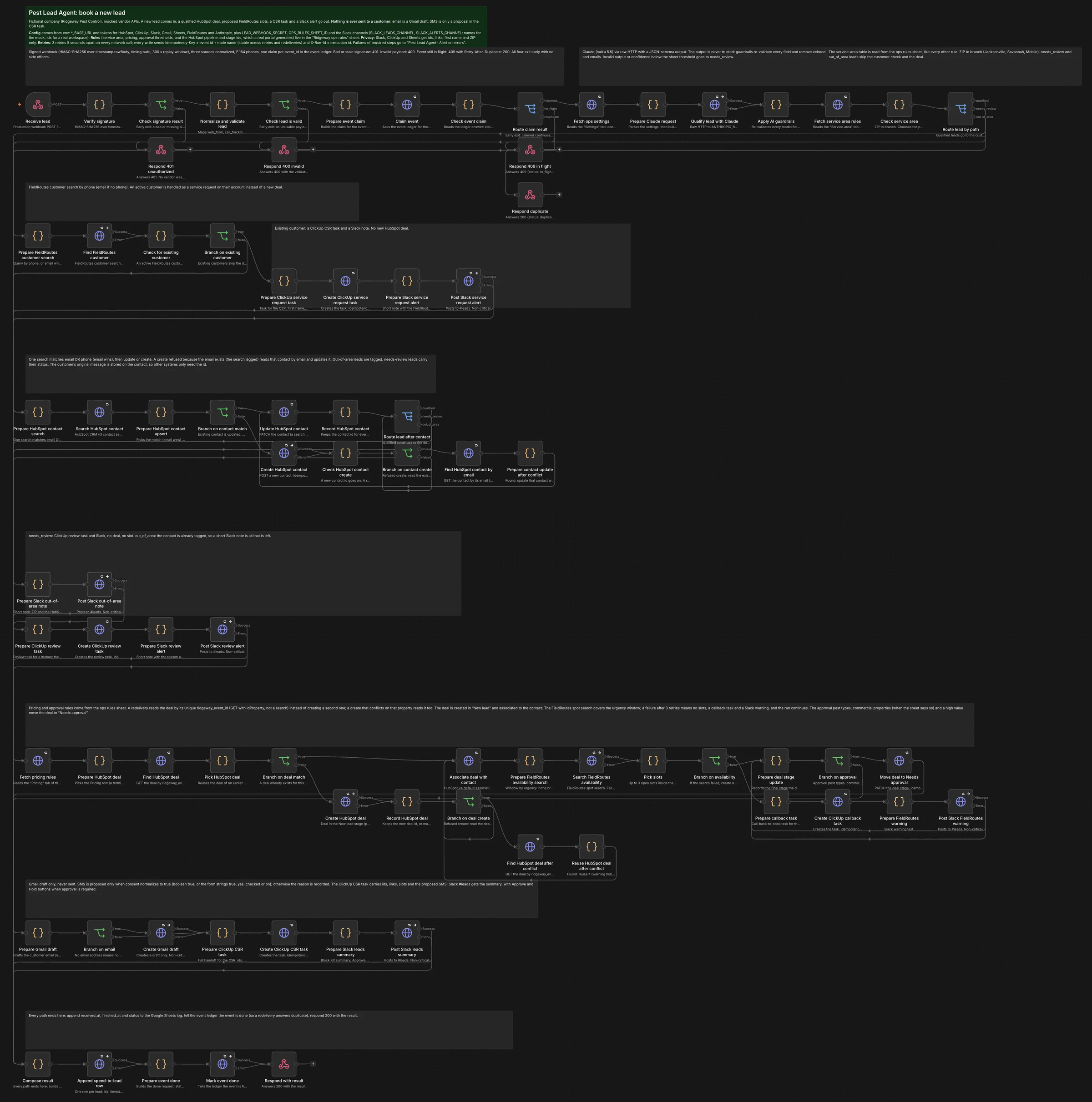
It is three n8n workflows:
- Book new lead: 80 nodes in ten sections.
- Handle Approve / Hold: 28 nodes.
- Alert on errors: 6 nodes.
The workflow JSON is generated from source files and kept in git. It is checked with n8n-mcp's validator, with zero errors, before it is imported. The logic inside the Code nodes is plain functions with 117 unit tests that run without n8n.
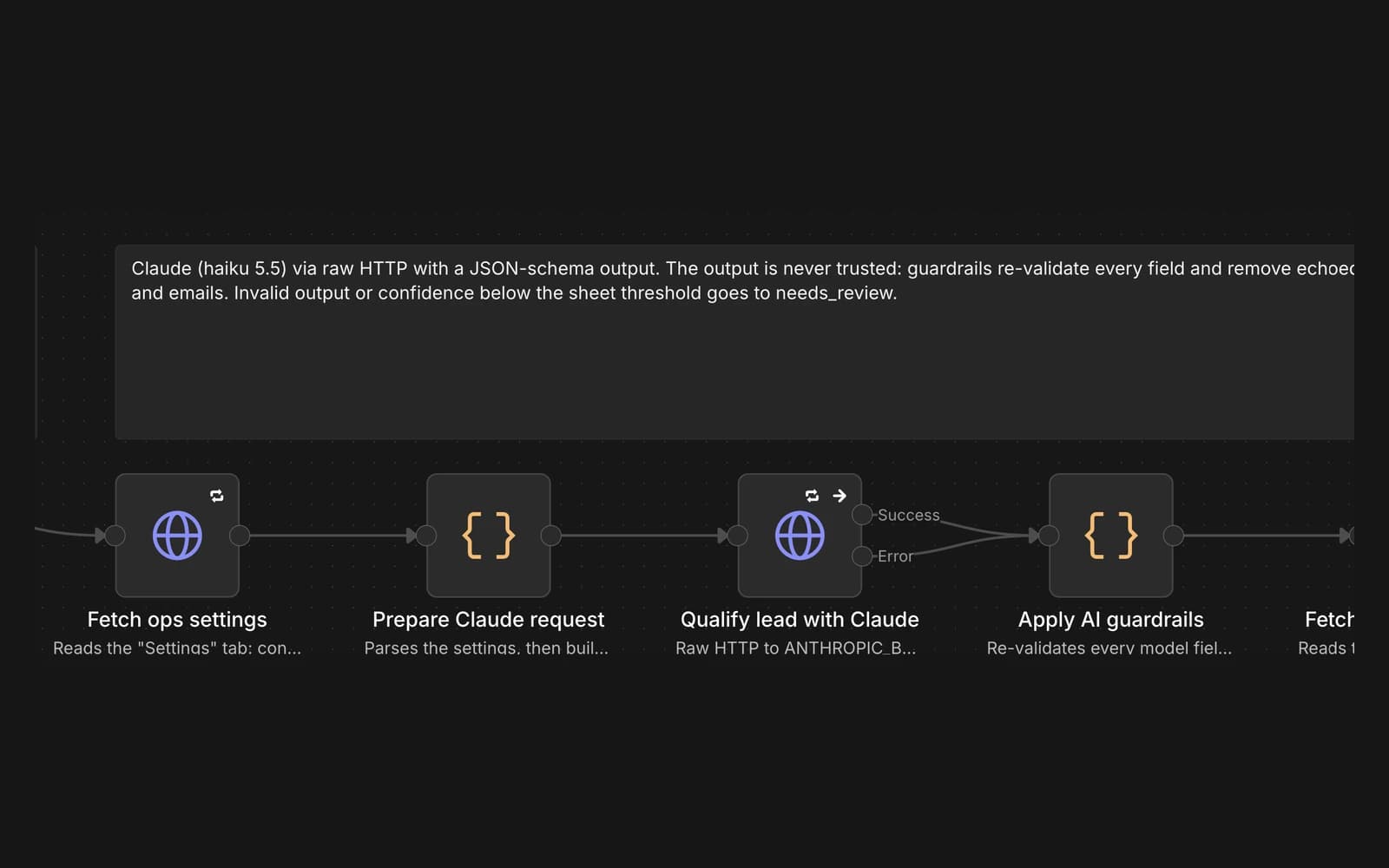
Claude reads the lead and nothing else. The call asks for a JSON schema, and the answer is treated as untrusted input:
- The guardrail step re-checks every field against an allowed list and removes any phone number or email the model echoes back.
- A refusal, a failed call, an invalid value or confidence under 0.6 sends the lead to a review task instead of a deal.
The model does not decide prices, approval thresholds, service areas or HubSpot stages. Those come from an ops rules sheet, so changing a price is a sheet edit, not a prompt change.
Every network call retries three times, five seconds apart. Every write carries an idempotency key built from the event id and the node name. HubSpot ignores idempotency keys, so each deal also carries a unique ridgeway_event_id property, and the workflow reads the deal by that id before it creates one.
Approval in Slack
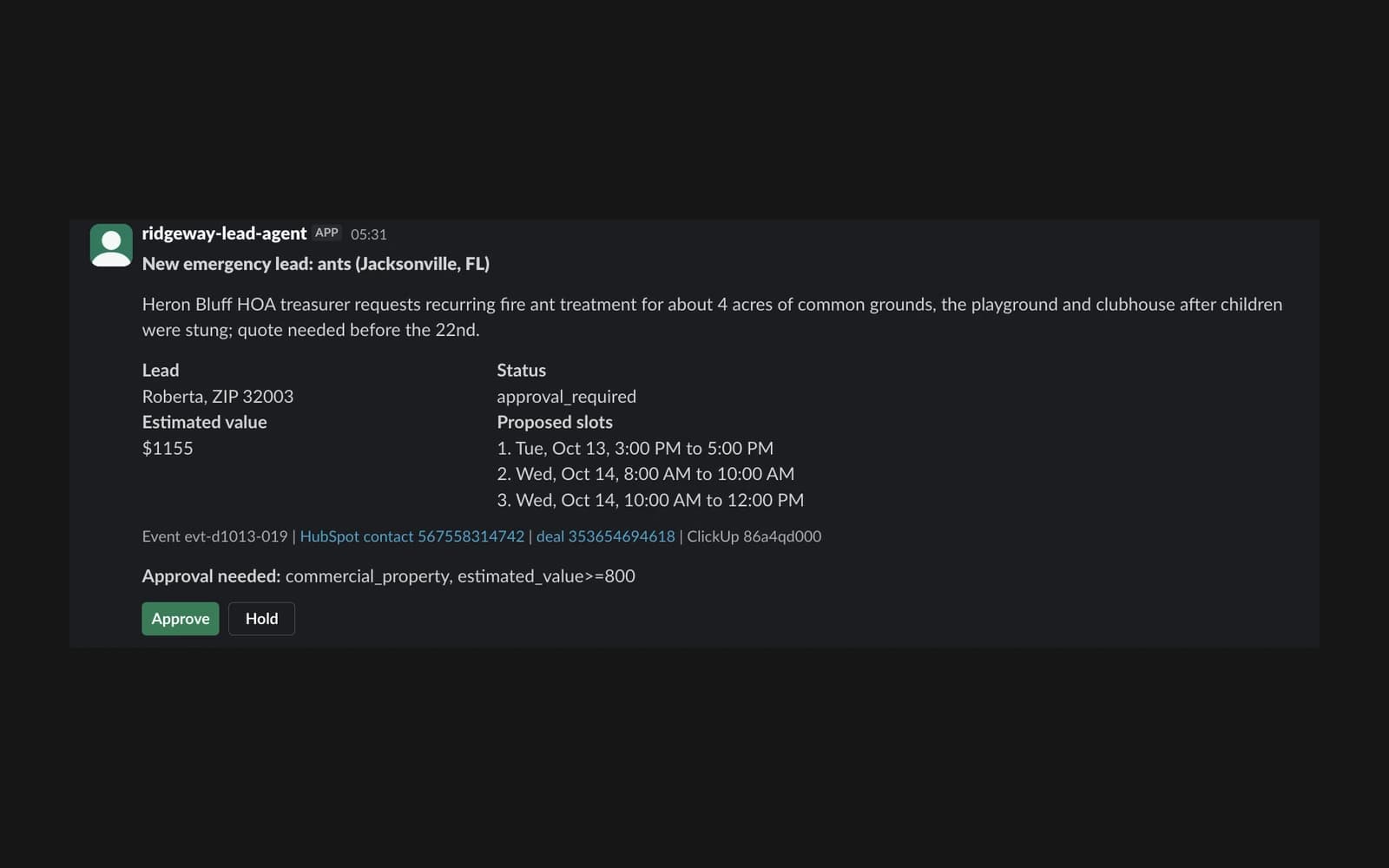
The workflow posted this message to a real Slack workspace I set up for the demo. The lead itself is from the simulated day. Commercial properties, termite and wildlife jobs, and estimates of $800 or more are held for a manager, and the message says which rule held it.
The Approve and Hold buttons come back through a small Socket Mode relay that signs each click. Only listed approvers can decide, anyone else gets a private notice, and the first decision wins: a second click or a Slack redelivery changes nothing.
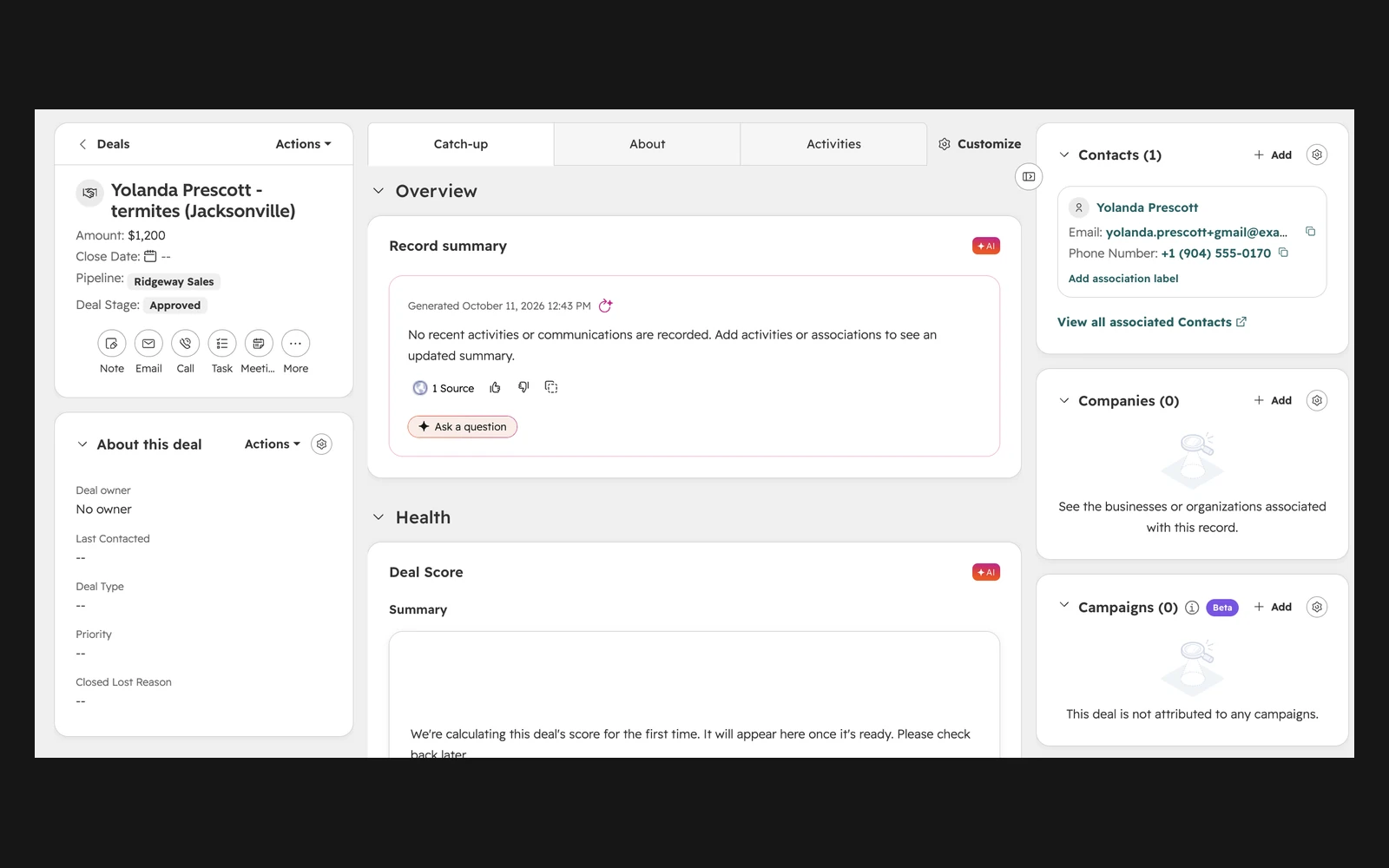
An Approve click in that workspace moved the deal in a HubSpot developer test account from Needs approval to Approved. The workflow then commented on the office's task and replaced the buttons with who approved it and when.
When things fail
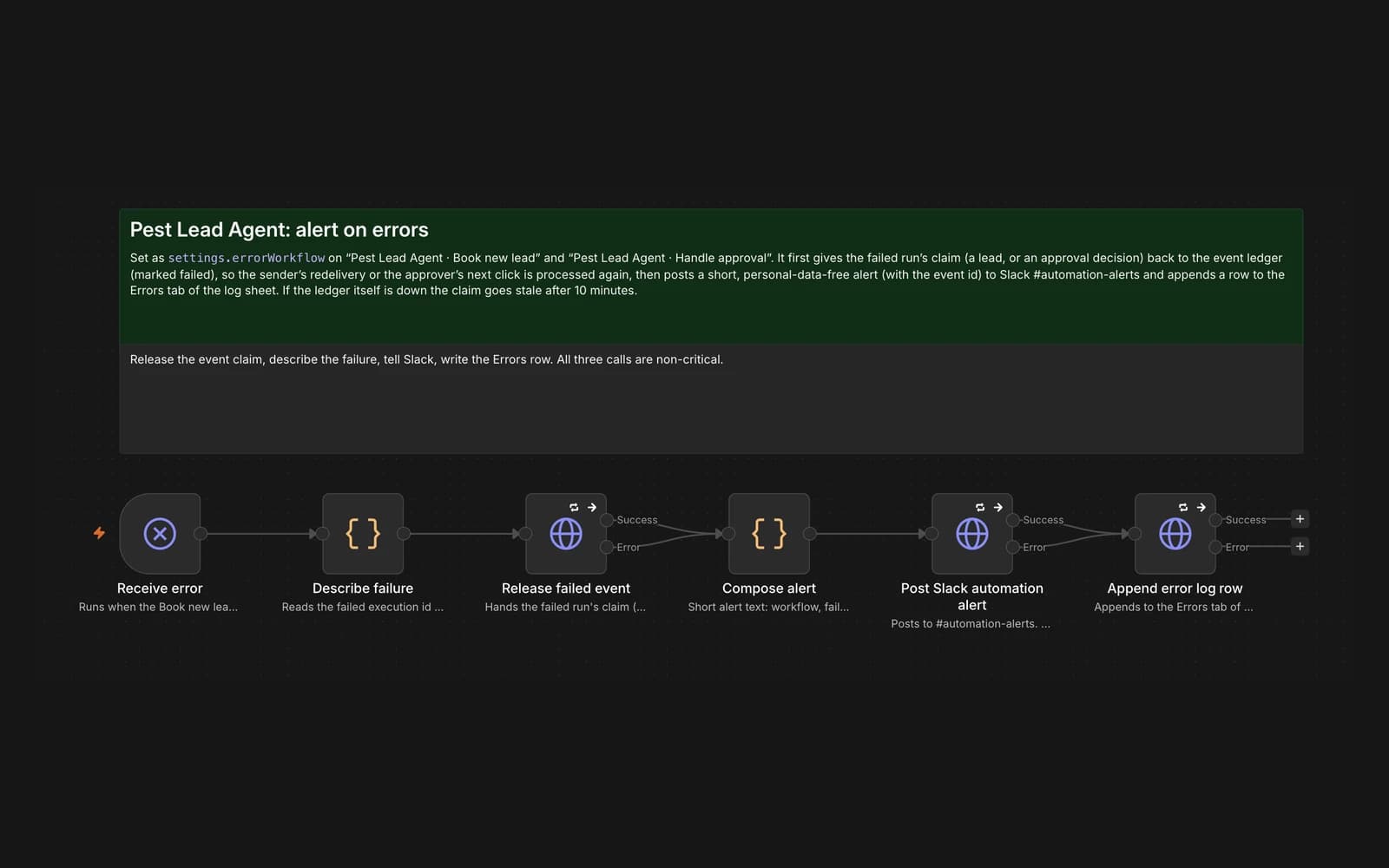
The hardest bug was duplicates. A second delivery of the same lead, arriving while the first run was still going, could start its own booking, because n8n saves workflow static data only when a run finishes. I moved the duplicate check into an external event ledger:
- A repeat that arrives mid-run gets a 409 with Retry-After.
- A repeat after the run gets "duplicate".
- If a run fails, the error workflow releases the event, so a redelivery can finish the job.
Steps that can fail without losing the lead have their own error path. If FieldRoutes is down, the office gets a "call back to book", and if Gmail fails, the task says no draft was created. If a required step fails after all its retries, the error workflow posts the event id to #automation-alerts, with no customer data, and logs the error.
Verification
The end-to-end suite runs the real workflows on an n8n 2.42.6 server against local mocks of every vendor. There are 36 checks: 21 scenarios plus the approval and error-path checks. Failures are injected on purpose:
- HubSpot rate limits
- FieldRoutes and Gmail outages
- A ClickUp task that is created but answers after the timeout
- A model answer with a pest that does not exist
- Bad and stale signatures
- Redeliveries during and after a run
Each check asserts the response, every request the mock received and what exists in the mock afterwards.
A simulated 40-lead day ran through the same workflows. Of the 40 deliveries, 27 got proposed slots and 8 were held for approval. Two went to review, one existing customer became a service request, one lead was outside the service area, and the one duplicate was caught.
The same day was then run twice against HubSpot. The first run created 33 deals and reused 2, and the second created none and reused all 35.
With mocked vendors and replayed answers, the median time from webhook to office task was 0.25 seconds. That is the workflow's own overhead. The recorded Claude call itself took a median of 3.3 seconds.
The code, the build log and the full results are on GitHub.
What it does not show
This is a portfolio build. It has not run in production or touched a real customer:
- The company, people and addresses are invented, and the prices are illustrative.
- FieldRoutes, ClickUp, Gmail, Google Sheets and the event ledger are mocks that follow each vendor's API shapes.
- Slack and HubSpot were real only in my own test accounts.
- Claude's answers were recorded from 52 real calls and are replayed in tests. The full live-model run is from an earlier version of the workflow.
- Email is only ever drafted and SMS only proposed, so nothing reaches a customer.
For a real office I would make four changes:
- Move the API keys from environment variables into n8n credentials.
- Put the event ledger in Postgres or Redis.
- Run n8n in queue mode.
- Point each mock at the company's own accounts. The workflows would not change.